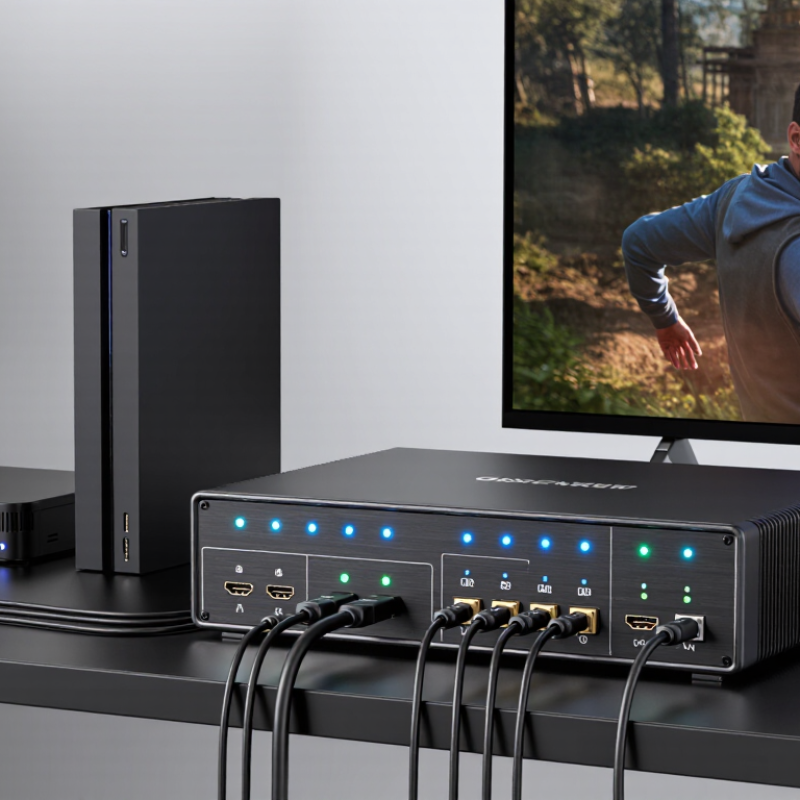
| Basic Configuration | 4 HDMI inputs and 2 HDMI outputs | A 4x2 matrix accepts up to four source devices and sends any selected source to either of two displays. Each output can usually select a different input at the same time. |
| Typical Source Devices | Media player, game console, computer, set-top box, or Blu-ray player | Four inputs allow several HDMI sources to remain connected, reducing the need to repeatedly unplug and reconnect cables. |
| Output Routing | Independent output switching | For example, Output 1 can display Input 1 while Output 2 displays Input 3. Confirm that the model supports independent routing rather than only mirroring one source. |
| Video Resolution | Choose according to the display system: 1920 × 1080 for Full HD, 3840 × 2160 for 4K UHD | The matrix, HDMI cables, source devices, and displays must all support the intended resolution. A 4K display does not automatically make every connected source output 4K. |
| Refresh Rate | 60 Hz for general 4K video; higher refresh rates require explicit product support | Resolution and refresh rate work together. A switch may support 4K at 30 Hz but not 4K at 60 Hz, so both values should be checked in the specification sheet. |
| HDMI Bandwidth | At least 10.2 Gbps for many 4K 30 Hz systems; approximately 18 Gbps for common 4K 60 Hz 4:4:4 systems | Insufficient bandwidth can limit resolution, refresh rate, color format, or HDR performance. Select a bandwidth rating that matches the highest signal in the system. |
| HDR Support | Look for stated support for HDR10, HLG, or other required HDR formats | HDR compatibility depends on the complete signal path. The source, matrix, cable, and display must support the same HDR format. |
| Color and Chroma | 4:4:4 for text and computer graphics; 4:2:0 or 4:2:2 may be used by some video sources | Chroma subsampling affects color detail. Computer users should verify support for the desired RGB or 4:4:4 signal at the selected resolution and refresh rate. |
| HDCP Compatibility | HDCP 2.2 for many protected 4K sources; backward compatibility with earlier HDCP versions is useful | HDCP authentication protects digital content. A mismatch between source, matrix, and display can cause a blank screen or an error message. |
| EDID Management | Automatic EDID, fixed EDID profiles, or manual EDID learning | EDID tells a source which video and audio formats a display supports. Good EDID control helps prevent incorrect resolution selection when two displays have different capabilities. |
| Mixed-Display Systems | Verify how the unit handles displays with different resolutions or HDR capabilities | Some matrix switches use a common compatible format for both outputs, while others offer more flexible output-specific EDID control. This is important when combining Full HD and 4K displays. |
| Audio Extraction | Optional support for stereo analog, optical, or HDMI audio output | Audio extraction can send sound to powered speakers, an amplifier, or headphones while video continues to a display. Check supported audio formats and maximum channel configuration. |
| Audio Formats | PCM 2.0 for broad compatibility; multichannel bitstream support only when explicitly listed | Advanced formats may require compatible source, matrix, display, receiver, and EDID settings. Stereo PCM is generally the safest choice for mixed equipment. |
| Control Methods | Front-panel buttons, infrared remote, and optional RS-232 or network control | Buttons and remote controls suit home use. RS-232 or network control is more practical for installed systems, automation, and centralized equipment racks. |
| Switching Behavior | Fast switching, signal detection, and stable re-authentication | Changing inputs may trigger HDMI handshaking and HDCP authentication. Features such as signal memory and fast switching can reduce black screens and repeated reconnection delays. |
| HDMI Cable Planning | Use certified cables appropriate for the required resolution, bandwidth, and distance | Longer cables and poor-quality connections can cause intermittent video, sparkles, audio dropouts, or loss of signal. Keep cable runs as short as practical and avoid unnecessary adapters. |
| Installation Environment | Check ventilation, power supply, mounting options, and operating temperature | A matrix switch should have adequate airflow and a stable power source. Rack ears or mounting hardware may be useful for permanent installations. |
| Best Choice for Full HD | 1080p at 60 Hz, HDCP compatibility, basic EDID, and remote control | This configuration is suitable for classrooms, meeting rooms, and home systems that do not require 4K or advanced HDR features. |
| Best Choice for 4K Home Entertainment | 4K at 60 Hz, approximately 18 Gbps bandwidth, HDR support, HDCP 2.2, and EDID management | These features provide a stronger match for modern 4K sources and displays, especially when protected content and HDR are required. |
| Best Choice for Computer and Gaming Use | Required resolution and refresh rate, low-latency switching, suitable chroma support, and gaming-feature compatibility | Gaming and computer signals can demand higher refresh rates and full chroma detail. Confirm the exact combination of resolution, refresh rate, HDR, and variable-refresh features before purchase. |
| How the Signal Flows | Source device → HDMI input → matrix routing circuit → selected HDMI output → display | The matrix receives each source signal, reads display capability data through EDID, manages HDCP authentication, and routes the selected signal to one or both outputs. |
| Practical Buying Rule | Choose based on the highest required resolution, refresh rate, bandwidth, HDR format, HDCP version, and audio format | The most suitable model is not necessarily the one with the largest number of features. Compatibility with every device in the signal chain is the key requirement. |

.svg)